Xero Accounting Connector for Dynamics 365 CRM
Seamlessly synchronize data among Xero, Dynamics 365, and Power Apps with our automated, no-code solution.
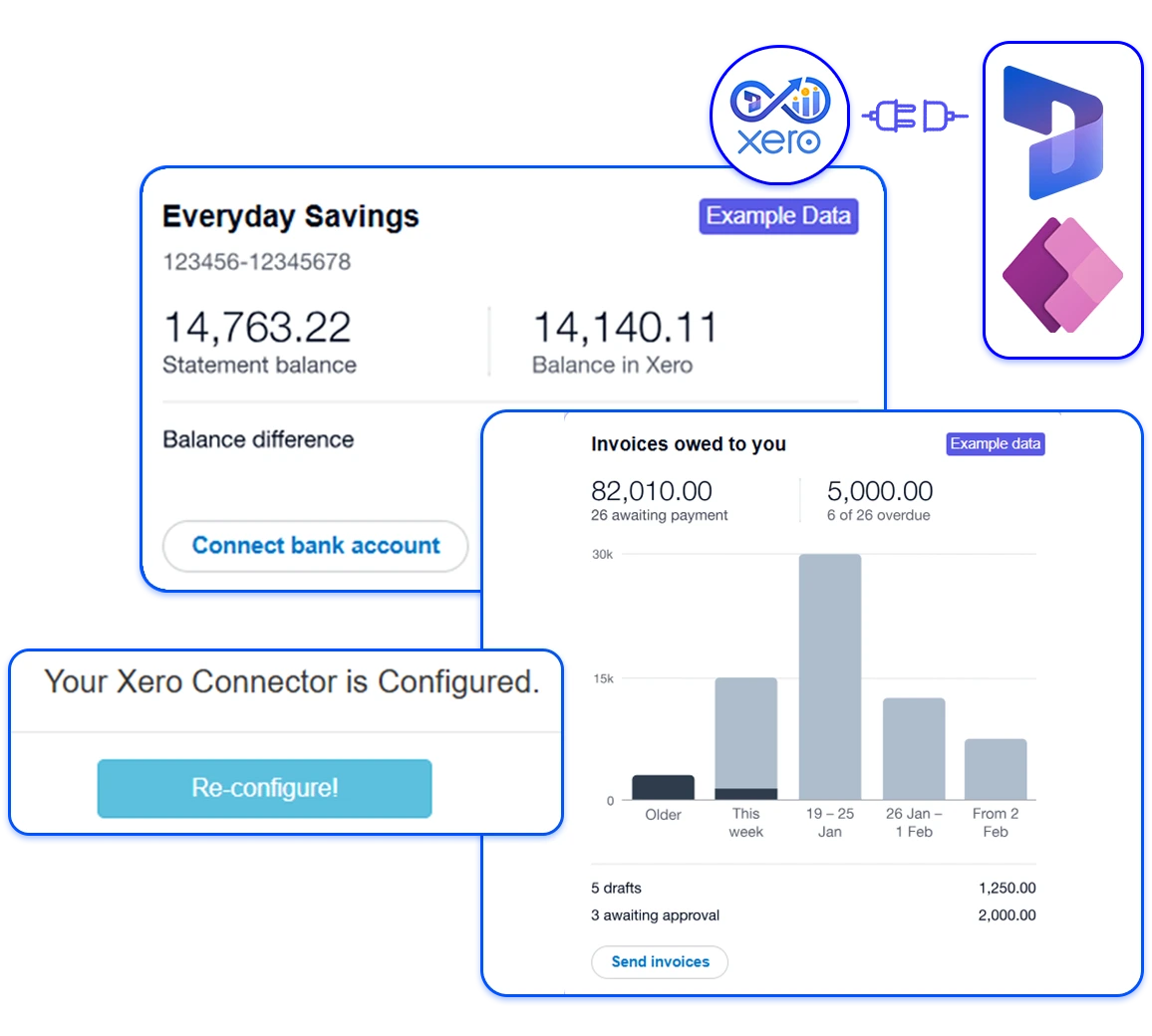

What is the Xero Accounting Connector for Dynamics 365?
A smart integration solution to automate data transfer from Dynamics 365 to Xero and Xero to Dynamics 365.
The Xero Accounting Connector is a dedicated integration add-on that connects Dynamics 365 CRM to Xero accounting software, enabling seamless synchronization of financial and customer data between the two systems. Instead of manually transferring information between platforms, the connector automatically keeps key data such as contacts, invoices, payments, tax rates, and products aligned across Power Apps, Dynamics 365, and Xero.
Designed for businesses that rely on Dynamics 365 for customer and sales management while using Xero for accounting, this D365 add-on helps unify operational and financial workflows. With configurable synchronization, secure API integration, and flexible field mapping, the connector enables organizations to unify their systems and maintain accurate, consistent financial data. This enables better operational efficiency, improved data reliability, and a clearer view of business performance across departments.
Why Businesses Need a Xero Accounting Connector for Dynamics 365?
Growing organizations rely on connected systems to manage sales, customers, and finances efficiently, while also supporting daily operations.
| Business Scenario | Without CRM-Xero Integration | With Xero Accounting Connector Add-On |
|---|---|---|
| Data Transfer Between Systems ➜ | ✘ Manual transfer of invoices, payments, and customer data between systems. | ✔ Automatic synchronization of financial and customer data between Dynamics 365 and Xero. |
| Data Accuracy ➜ | ✘ High risk of duplicate entries and inconsistent records. | ✔ Accurate and consistent data across CRM and accounting platforms. |
| Team Collaboration ➜ | ✘ Sales and finance teams work in separate systems with limited visibility. | ✔ Unified workflow where both teams work with the same updated information. |
| Operational Efficiency ➜ | ✘ Time-consuming reconciliation of CRM and accounting records. | ✔ Streamlined processes with automated data alignment. |
| Integration Cost & Maintenance ➜ | ✘ Custom integrations can be costly and difficult to maintain. | ✔ A ready Dynamics 365 add-on designed to connect CRM and accounting systems efficiently. |
| Business Visibility ➜ | ✘ Limited visibility into financial and sales performance. | ✔ Improved visibility across customer activity, invoices, and payments. |
Key Features of Xero Accounting Connector
Everything you need to automate data flow between Dynamics 365 and Xero while maintaining accuracy across systems.
The Xero Accounting Connector offers a built-in dashboard for tracking data movement, reviewing synchronization logs, and monitoring integration performance to maintain transparency and operational control.
Xero Dynamics 365 integration enables important data to flow between these systems in real time or via scheduled synchronization. This ensures both systems reflect the latest financial and customer information.
Core business data, such as customer records, chart of accounts, products, and tax rates, can be synchronized between systems. This helps maintain consistent master data across CRM and accounting environments.
The connector enables seamless synchronization of invoices created in Dynamics 365 with Xero, ensuring financial records are updated accurately in the CRM system for other teams without manual intervention.
Payment records can be automatically synced from Xero to Dynamics 365, helping finance teams to track payment status and maintain up-to-date accounting data and financial visibility within the CRM.
Using a configurable interface, users can map fields between Dynamics 365 and Xero according to their business needs. This flexibility allows organizations to align data structures across systems without complex development.
The integration uses secure API connections and modern authentication protocols to ensure that data transferred between Dynamics 365 and Xero remains protected and compliant with industry security standards.
For businesses operating with geographically distributed teams to manage different accounting structures, the connector supports synchronization across multiple organizations – keeping CRM and financial systems aligned.
By connecting CRM and accounting workflows, the connector enables sales and finance teams to work with the same data, improving collaboration and operational efficiency across departments.
Key Features of Xero Accounting Connector
Everything you need to automate data flow between Dynamics 365 and Xero while maintaining accuracy across systems.
The Xero Accounting Connector offers a built-in dashboard for tracking data movement, reviewing synchronization logs, and monitoring integration performance to maintain transparency and operational control.
Xero Dynamics 365 integration enables important data to flow between these systems in real time or via scheduled synchronization. This ensures both systems reflect the latest financial and customer information.
Core business data, such as customer records, chart of accounts, products, and tax rates, can be synchronized between systems. This helps maintain consistent master data across CRM and accounting environments.
The connector enables seamless synchronization of invoices and payment records between Dynamics 365 and Xero, allowing finance teams to maintain accurate accounting data automatically without manual updates.
Payment records can be automatically synced from Xero to Dynamics 365, helping finance teams to track payment status and maintain up-to-date accounting data and financial visibility within the CRM.
Using a configurable interface, users can map fields between Dynamics 365 and Xero according to their business needs. This flexibility allows organizations to align data structures across systems without complex development.
The integration uses secure API connections and modern authentication protocols to ensure that data transferred between Dynamics 365 and Xero remains protected and compliant with industry security standards.
For businesses operating with geographically distributed teams to manage different accounting structures, the connector supports synchronization across multiple organizations – keeping CRM and financial systems aligned.
By connecting CRM and accounting workflows, the connector enables sales and finance teams to work with the same data, improving collaboration and operational efficiency across departments.
Why Invest in Xero CRM Integration?
Simplify day-to-day workflows by integrating CRM and accounting systems and keeping data synchronized across Dynamics 365 and Xero.
With the Dynamics 365 Xero integration add-on, you can automatically transfer desired financial and customer information between systems, ensuring records stay synchronized.
By automating synchronization and real-time data transfer, the Xero connector helps teams reduce repetitive tasks and focus on higher-value activities that support business growth.
With a reliable CRM accounting software integration, organizations can maintain accurate data across both platforms, helping teams work with the same up-to-date financial information.
Organizations using our Dynamics 365 add-on for CRM accounting integration can easily synchronize both systems without building a custom integration layer and with minimal technical overhead.
With the Dynamics 365 Xero integration add-on, you can automatically transfer desired financial and customer information between systems, ensuring records stay synchronized.
By automating synchronization and real-time data transfer, the Xero connector helps teams reduce repetitive tasks and focus on higher-value activities that support business growth.
With a reliable CRM accounting software integration, organizations can maintain accurate data across both platforms, helping teams work with the same up-to-date financial information.
Organizations using our Dynamics 365 add-on for CRM accounting integration can easily synchronize both systems without building a custom integration layer and with minimal technical overhead.
Stop Moving Data Between CRM and Accounting Manually?
Discover how connecting Dynamics 365 with Xero can automate financial data exchange and help your teams spend less time on manual updates.
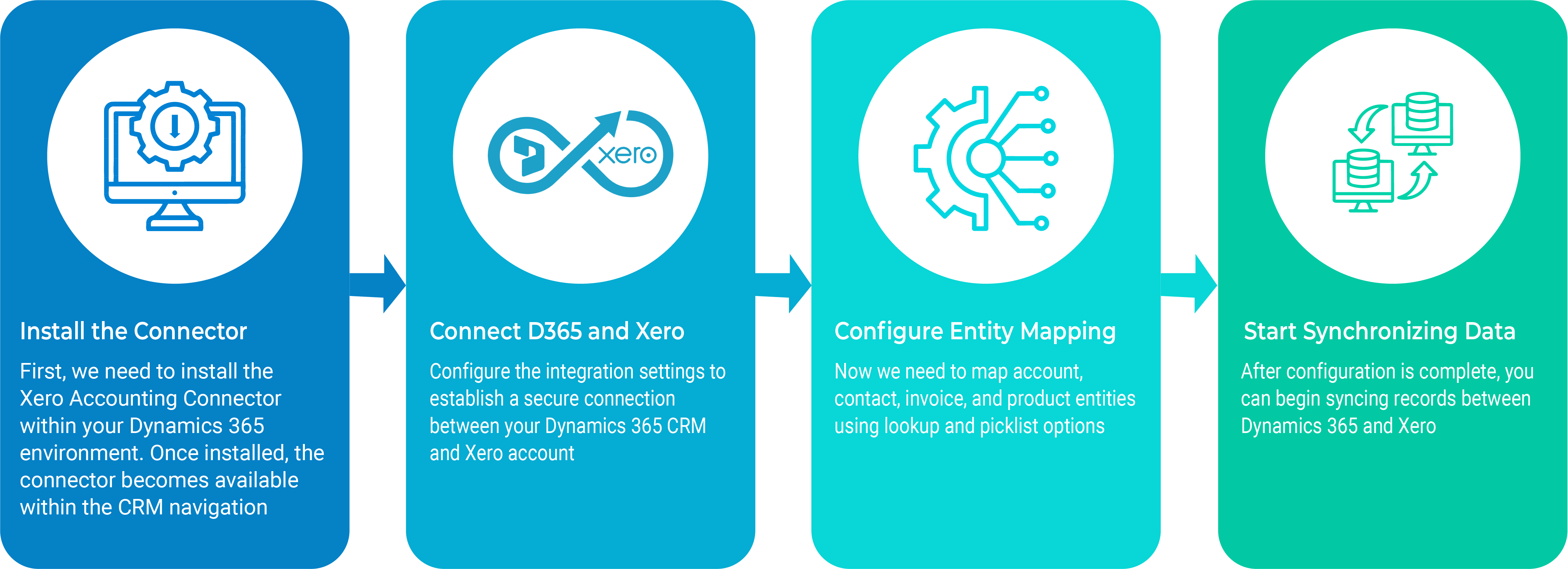
How to Get Started?
Getting started with the Xero accounting connector for Dynamics 365 is straightforward, taking only a few minutes. The setup process does not require complex development or custom integration work.
Check Our Other Productivity Booster Add-Ons for CRM & Power Apps

See How Dynamics 365 and Xero Can Work Together
Don’t just rely on claims; see how CRM and accounting systems can automate data flow, improve accuracy, and give your teams a clearer view in action.
Frequently Asked Questions
With the help of Soluzione’s Xero Accounting Connector add-on, an organization can easily and cost-effectively integrate Xero with Dynamics 365. Not just does it connect both systems, but it also syncs the data and transfers required insights such as contacts, invoices, payments, products, and tax details.
Both CRM systems and accounting software typically serve different purposes. A CRM manages customer relationships, opportunities, and sales activity, while accounting software manages financial transactions such as invoices and payments.
When these systems are not connected, teams often rely on manual data transfer, which leads to errors, delays, and inconsistencies. To avoid these errors, save time and effort, and maintain consistent data across systems, one should integrate accounting software with CRM.
Yes, with the right Microsoft Dynamics 365 add-ons such as Soluzione’s Xero Accounting Connector, one can easily and seamlessly connect Xero and CRM.
There are multiple benefits of integrating CRM and accounting software for a business:
Streamline operations and improve data reliability.
- Important information, such as customers, invoices, and payments, can move automatically between platforms.
- Reduce manual data entry efforts.
- Improve accuracy.
- Better visibility.
Yes, integrations between Xero and Dynamics 365 typically rely on secure API connections and modern authentication mechanisms. The Xero Accounting Connector uses secure communication protocols and authenticated API access to exchange information between systems.
Installation is quick and straightforward, taking just a few minutes, and does not require developer involvement.
Yes. Many integrations, including the Xero Accounting Connector, allow organizations to configure how data flows between systems. Field mapping and synchronization settings can be adjusted to match existing business workflows.
Basic setup typically does not require extensive development work because the connector is designed as a Dynamics 365 add-on that integrates directly with the CRM environment. Installation and configuration can usually be handled through standard system setup processes.
We also provide a user manual and a video to assess the integration.



180, Talmadge Road, Unit# 332, Edison (NJ) 08817 USA
Phone : +1-800-860-6531

10, Anson Road # 22-02, International Plaza 079903 SGD
Phone: +65-98-357-694

B-52, IT Park Badwai, Bhopal (MP) 462036 IND
Phone: +91 9302-980-560
180, Talmadge Road, Unit# 332, Edison (NJ) 08817 USA
Phone : +1-800-860-6531
10, Anson Road # 22-02, International Plaza 079903 SGD
Phone: +65-98-357-694
B-52, IT Park Badwai, Bhopal (MP) 462036 IND
Phone: +91-9302-980-560
